
As software projects grow, managing code changes becomes much more challenging than simply creating branches and merging them back into the main branch. Multiple developers may be working on different features, bug fixes, and releases simultaneously. Without a clear branching strategy, teams often face merge conflicts, unstable releases, and confusion about which code should be deployed to production.
This is why modern development teams adopt a Git branching strategy. A branching strategy defines how developers create branches, collaborate on code, review changes, and release software. The right strategy can improve team productivity, reduce deployment risks, and make releases far more predictable.
Among the many branching models available today, three approaches have become the most popular: Git Flow, GitHub Flow, and Trunk-Based Development. Each follows a different philosophy and is designed for different types of teams and release processes.
Why Branching Strategies Matter
Imagine a team of ten developers working on the same application. One developer is building a payment feature, another is fixing production bugs, while others are preparing the next release. If everyone pushes changes directly into the same branch, the codebase quickly becomes difficult to manage.
A structured branching strategy helps teams isolate changes, review code properly, and ensure production remains stable. It also creates a predictable workflow that every developer can follow. Whether your team deploys once every few months or several times per day, having a branching strategy is essential for maintaining code quality and reducing deployment risks.
Git Flow
Git Flow is one of the oldest and most structured Git workflows. It was designed for projects that follow scheduled releases and require clear separation between development and production code.
In Git Flow, developers typically work on feature branches that are merged into a dedicated develop branch. When the team is ready to prepare a release, a release branch is created. Any urgent production issues are handled through separate hotfix branches. The main branch always contains production-ready code.
A simplified structure looks like this:
main
│
├── release/*
├── hotfix/*
│
└── develop
     ├── feature/login
     ├── feature/payment
     └── feature/dashboard
The biggest advantage of Git Flow is its strong release management process. Since development happens separately from production, teams can continue building new features while another team prepares a release. This approach is particularly useful for enterprise applications, banking systems, ERP platforms, and other environments where releases are carefully planned and tested.
However, Git Flow also introduces additional complexity. Multiple long-lived branches mean more merging, more maintenance, and a higher chance of merge conflicts. For organizations practicing continuous deployment, Git Flow often feels too heavy and slow.
GitHub Flow
GitHub Flow was designed to simplify collaboration and support frequent deployments. Unlike Git Flow, it uses only one long-lived branch: main.
When a developer starts working on a feature, they create a short-lived branch from main, make their changes, open a pull request, and merge back after review. Once merged, the code can be deployed immediately.
The workflow is intentionally simple:
main
│
├── feature-login
├── bugfix-api
└── feature-payment
This simplicity is one of GitHub Flow's biggest strengths. Developers do not need to manage release branches, develop branches, or hotfix branches. Everything revolves around short-lived feature branches and pull requests.
GitHub Flow works particularly well for SaaS products, startup environments, and web applications that deploy frequently. Teams can release new features quickly while still maintaining quality through code reviews and automated testing.
The tradeoff is that production stability depends heavily on CI/CD pipelines and automated testing. Since all changes eventually merge directly into main, weak testing practices can introduce bugs into production more easily than in a structured workflow like Git Flow.
Trunk-Based Development
Trunk-Based Development is a modern workflow commonly used by organizations practicing DevOps and Continuous Delivery. The core idea is simple: developers integrate their changes into a shared branch, often called main or trunk, as frequently as possible.
Instead of maintaining long-lived feature branches, developers create very small branches that typically live for only a few hours or a day before being merged.
main
│
├── short-lived branch
├── short-lived branch
└── short-lived branch
This frequent integration significantly reduces merge conflicts because developers are constantly syncing their work with the latest codebase. It also enables rapid deployment cycles, making it ideal for organizations that release software multiple times per day.
A key concept in Trunk-Based Development is the use of Feature Flags. Rather than keeping unfinished work in long-running branches, developers merge code into the main branch and hide incomplete functionality behind a feature flag. This allows teams to deploy continuously without exposing unfinished features to users.
Many modern engineering organizations favor Trunk-Based Development because it aligns naturally with CI/CD pipelines, automated testing, and cloud-native architectures. Companies building microservices, SaaS platforms, and large-scale DevOps environments often choose this model because it enables fast and reliable software delivery.
The downside is that Trunk-Based Development requires discipline. Teams must invest heavily in automated testing, code reviews, and deployment automation. Without these practices, frequent integration can quickly become risky.
Side-by-Side Comparison
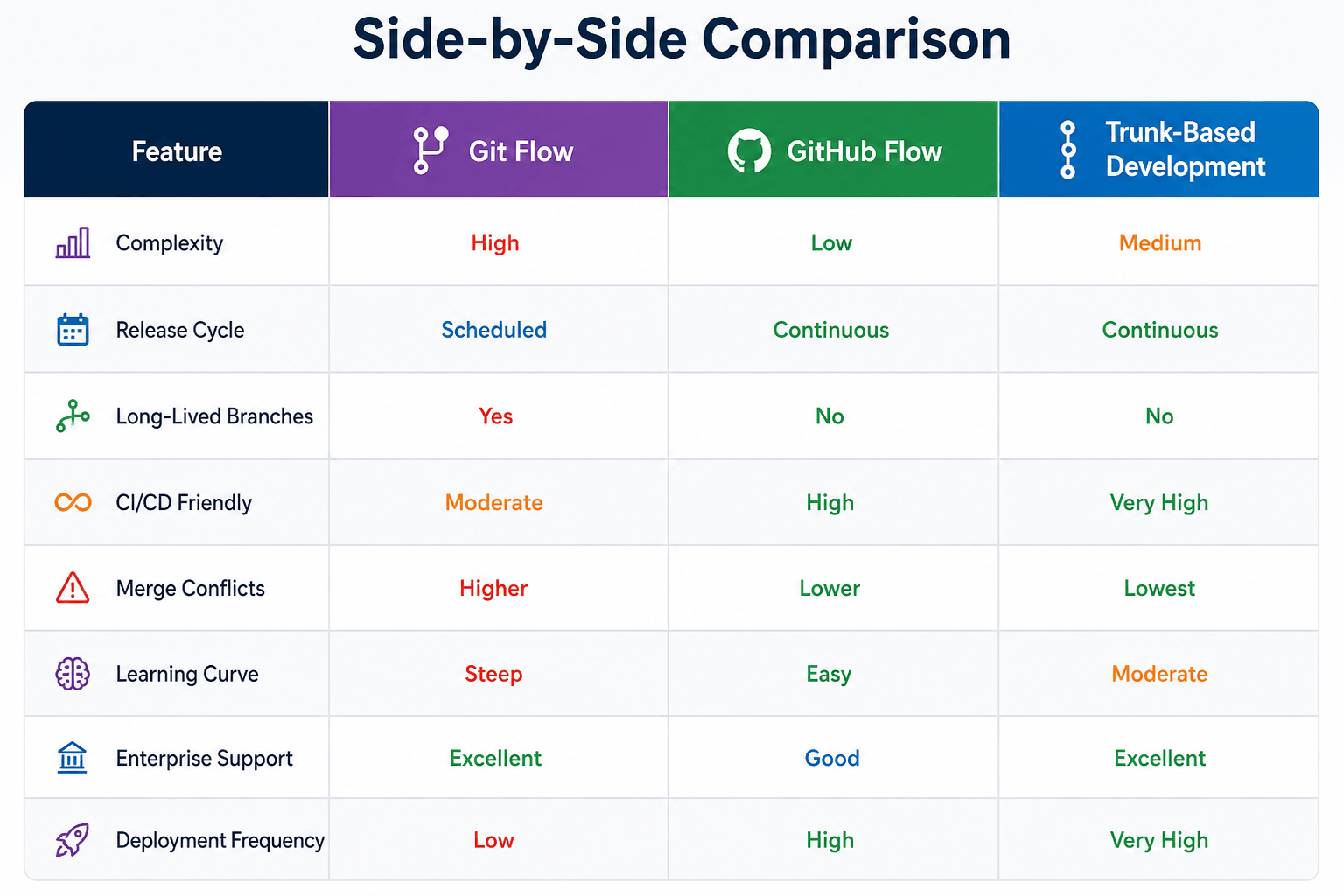
There is no universally correct branching strategy. The best choice depends on how your team develops and releases software.
If your organization follows scheduled releases, requires extensive testing before deployment, or maintains multiple software versions, Git Flow remains a strong option. Its structured process provides excellent control over releases and production stability.
If your team deploys frequently and values simplicity, GitHub Flow is often the better choice. It reduces operational overhead while supporting modern CI/CD practices.
For teams practicing DevOps, Continuous Integration, and Continuous Delivery, Trunk-Based Development is usually the most effective approach. By encouraging frequent integration and automation, it enables faster releases and fewer merge conflicts.
In reality, many organizations adopt variations of these workflows rather than following them exactly. The goal is not to choose the most popular strategy but to select the one that fits your team's size, release process, and engineering culture.
Final Thoughts
A good Git branching strategy can significantly improve collaboration, code quality, and deployment reliability. Git Flow provides structure for organizations with planned releases, GitHub Flow offers simplicity for fast-moving teams, and Trunk-Based Development supports modern DevOps practices with rapid delivery cycles.
As your project grows, the workflow you choose becomes just as important as the code itself. The most successful teams are not necessarily using the most advanced branching strategy — they are using one that everyone understands and follows consistently.