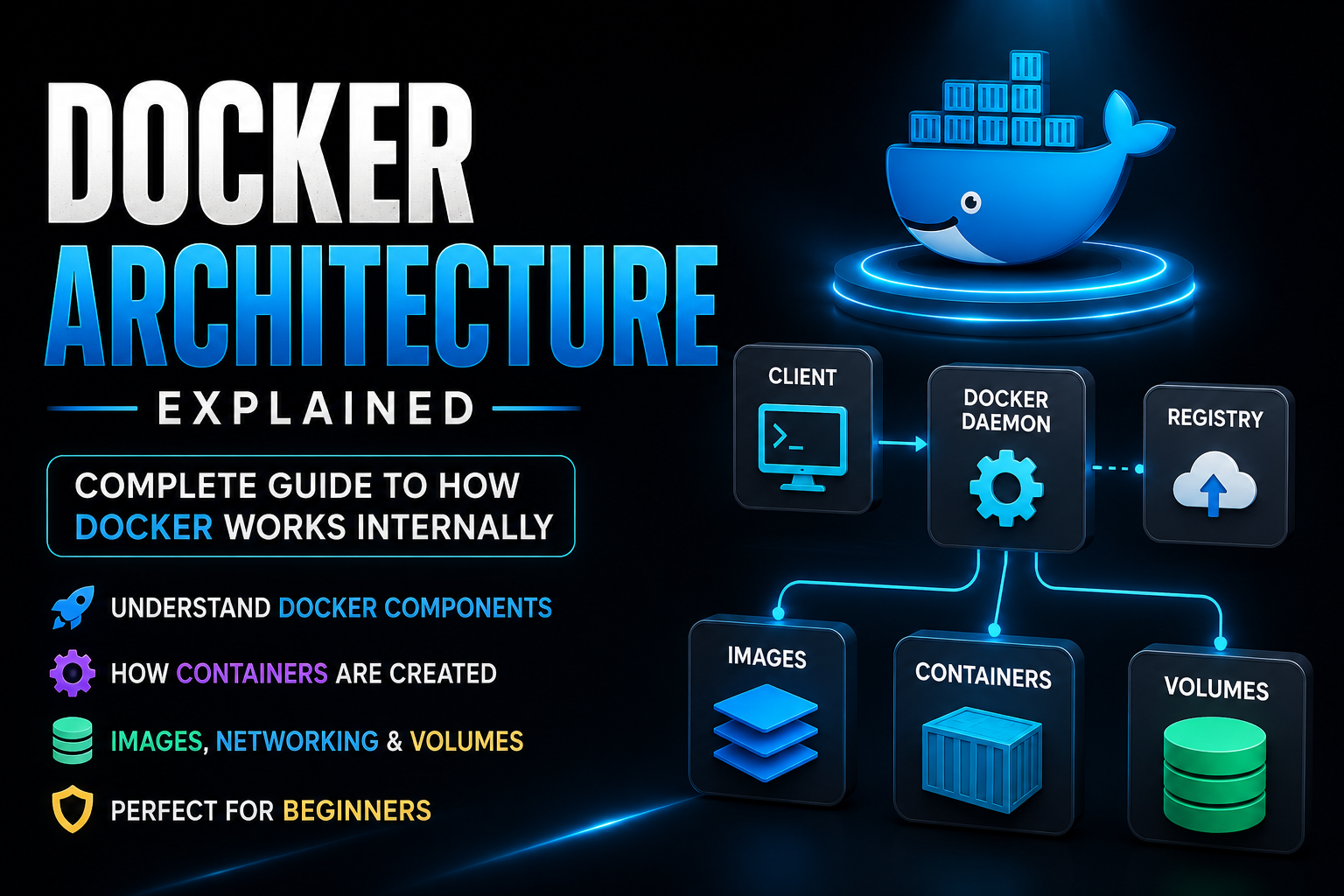
Modern applications are no longer built on a single server.
Today, developers build applications using multiple services, cloud platforms, CI/CD pipelines, microservices, and containers. But before Docker became popular, managing application environments was honestly painful.
A developer would build an application on their laptop, and everything worked perfectly.
Then the same project would fail on another machine because:
- Different operating system
- Missing dependencies
- Wrong package versions
- Database conflicts
- Runtime mismatch
This problem became extremely common in software development.
And this is exactly where Docker changed everything.
Docker allows developers to package applications along with all dependencies into lightweight containers that can run consistently on any system.
But behind those simple Docker commands lies a powerful architecture working internally.
Whenever you run commands like:
docker build
docker run
docker pull
Docker follows a complete internal workflow to build images, create containers, manage storage, and handle networking.
Understanding Docker Architecture helps developers move beyond memorizing commands and actually understand how Docker works internally.
What is Docker Architecture?
Docker Architecture refers to the internal structure and working mechanism of Docker.
It explains how different Docker components interact with each other to:
- Build Docker images
- Create containers
- Run applications
- Manage storage
- Handle networking
- Pull and push images
Docker follows a Client-Server Architecture where different components communicate together to perform containerization.
The architecture is designed to make applications:
- Portable
- Lightweight
- Fast
- Scalable
- Consistent across environments
Why Understanding Docker Architecture Matters
Many beginners start using Docker without understanding the actual workflow behind it.
Initially that works.
But once you start working on real-world projects involving:
- Kubernetes
- CI/CD pipelines
- Docker Compose
- Microservices
- Cloud deployments
understanding Docker Architecture becomes extremely important.
Because when applications fail in Docker, architecture knowledge helps you identify:
- Where the issue exists
- Which component failed
- Why containers are not starting
- Why networking is failing
- Why data disappears
This deeper understanding makes troubleshooting much easier.
High-Level Docker Architecture Overview
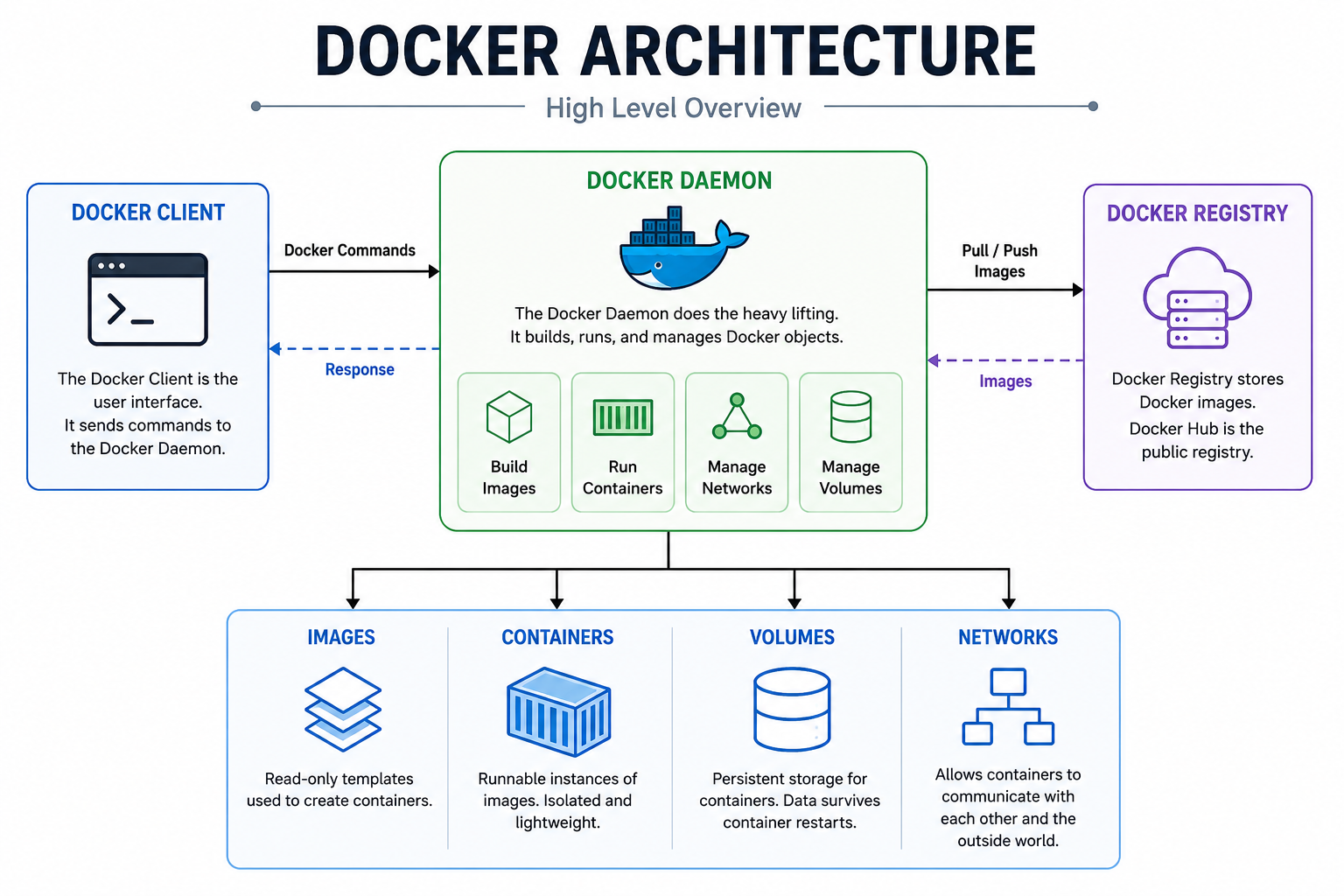
Docker Architecture mainly consists of the following components:
- Docker Client
- Docker Daemon
- Docker Images
- Docker Containers
- Docker Registry
- Docker Volumes
- Docker Networks
Each component plays an important role in Docker's workflow.
Docker Client — The Starting Point of Docker
Docker Client is the interface through which users interact with Docker.
Whenever you type commands like:
docker build
docker run
docker pull
docker push
you are interacting with the Docker Client.
The Docker Client itself does not create containers or images.
Instead, it sends requests to Docker Engine (Docker Daemon) using Docker APIs.
You can think of Docker Client like a remote control.
You press buttons on the remote, but the television performs the actual work.
Similarly:
- Docker Client accepts commands
- Docker Daemon performs operations
Responsibilities of Docker Client
Docker Client is responsible for:
- Accepting user commands
- Sending requests to Docker Engine
- Displaying Docker output
- Communicating with local or remote Docker servers
The client can communicate with:
- Local Docker Daemon
- Remote Docker Daemon
This allows remote container management in production environments.
Docker Daemon — The Core Engine of Docker
Docker Daemon is the main service running in the background.
It is the heart of Docker Architecture.
The daemon service is called:
dockerd
Docker Daemon listens for requests from Docker Client and performs all Docker operations internally.
Without Docker Daemon, Docker cannot function.
Responsibilities of Docker Daemon
Docker Daemon handles almost everything inside Docker.
Its responsibilities include:
- Building Docker images
- Running containers
- Managing Docker networks
- Managing Docker volumes
- Pulling images from Docker Hub
- Pushing images to registries
- Managing container lifecycle
Whenever you execute a Docker command, the daemon processes the request behind the scenes.
How Docker Actually Works Internally
Let's understand what happens internally when you run a simple command:
docker run nginx
Internally Docker performs the following sequence:
Step 1 — Docker Client Sends Request
The Docker Client receives your command and sends it to Docker Daemon.
Step 2 — Docker Daemon Checks Local Images
Docker Daemon checks whether the NGINX image already exists locally.
Step 3 — Pull Image from Docker Hub
If the image is not available locally, Docker pulls it from Docker Hub automatically.
Step 4 — Create Container
Docker creates a container using the NGINX image.
Step 5 — Start Container
The container starts running in an isolated environment.
Step 6 — Return Output
Docker Daemon sends the result back to Docker Client.
This entire process happens within seconds.
Docker Images — The Blueprint of Containers
Docker Images are read-only templates used to create containers.
An image contains everything required to run an application:
- Application source code
- Dependencies
- Runtime
- Libraries
- System tools
- Environment variables
Images act as blueprints for containers.
Containers are created using these images.
Real-Life Example of Docker Images
Think of a Docker Image like a recipe book.
The recipe contains all cooking instructions.
But the actual food is prepared only when you cook it.
Similarly:
- Docker Image = Recipe
- Docker Container = Prepared Food
Docker Images Use Layered Architecture
Docker Images are built using layers.
Every instruction inside a Dockerfile creates a separate layer.
Example:
FROM ubuntu

RUN apt update

RUN apt install nginx

COPY . .
Each instruction creates a new image layer.
This layered approach provides major advantages:
- Faster builds
- Better caching
- Smaller updates
- Storage optimization
Docker Containers — Running Instances of Images
Containers are running instances of Docker Images.
When Docker starts an image, it creates a container.
Containers provide isolated environments where applications run independently.
Each container contains:
- Application processes
- File system
- Network interface
- Runtime environment
Containers behave like lightweight mini-systems.
Why Docker Containers Are Lightweight
Unlike Virtual Machines, containers do not include a complete operating system.
Instead, containers share the host operating system kernel.
This makes them:
- Faster
- Smaller
- Lightweight
- Resource efficient
Containers can usually start within seconds.
This is one major reason why Docker became so popular in modern DevOps environments.
Docker Registry — Storage System for Docker Images
Docker Registry stores Docker Images.
The most popular registry is Docker Hub.
It works similarly to GitHub but specifically for Docker Images.
Developers use Docker Registry to:
- Store images
- Share images
- Download images
- Manage versions
Pulling Images from Docker Hub
Example:
docker pull nginx
This command downloads the official NGINX image from Docker Hub.
Pushing Custom Images
Developers can also upload their own images.
Example:
docker push username/myapp
This makes collaboration and deployment much easier.
Docker Volumes — Persistent Data Storage
Containers are temporary by nature.
If a container gets deleted, its internal data also disappears.
This creates problems for applications like:
- MySQL
- PostgreSQL
- MongoDB
- File upload systems
Docker Volumes solve this issue.
Volumes store data separately from containers.
This ensures data remains safe even if containers are removed.
Why Docker Volumes Are Important
Docker Volumes are commonly used for:
- Database storage
- Uploaded files
- Application logs
- Persistent application data
Example volume creation:
docker volume create mysql-data
Docker Networking — Communication Between Containers
Modern applications usually contain multiple containers.
For example:
- Frontend container
- Backend API container
- Database container
These containers need communication.
Docker Networking allows containers to communicate securely with each other.
Types of Docker Networks
Bridge Network
Default Docker network used for communication on the same host.
Host Network
Container directly uses the host machine's network.
Overlay Network
Used in Docker Swarm for communication across multiple servers.
Complete Docker Workflow Explained
Now let's understand the complete Docker workflow step-by-step.
Step 1 — Create Dockerfile
Developer writes instructions inside Dockerfile.
Example:
FROM node:18

WORKDIR /app

COPY . .

RUN npm install

CMD ["npm", "start"]
Step 2 — Build Docker Image
docker build -t my-app .
Docker converts Dockerfile into layered Docker Image.
Step 3 — Store Docker Image
The image gets stored locally.
Optionally, developers can push the image to Docker Hub.
Step 4 — Run Docker Container
docker run my-app
Docker creates a container using the image.
Step 5 — Application Starts Running
The application runs inside an isolated container environment.
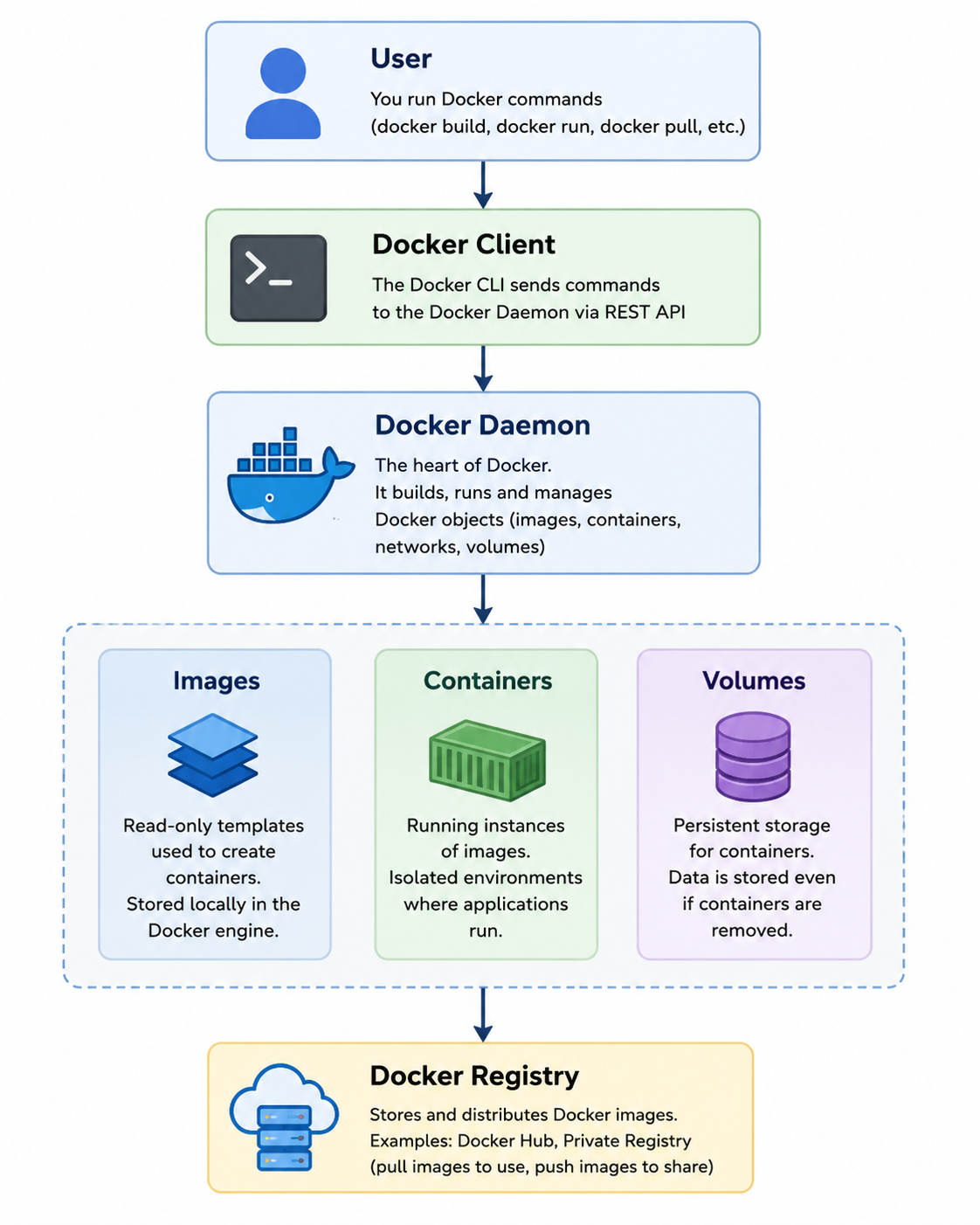
Docker Architecture Flow Diagram
Advantages of Docker Architecture
Lightweight Environment
Containers share the host kernel, reducing resource usage.
Faster Deployment
Applications start within seconds.
Portability
Applications run consistently across systems.
Better Isolation
Containers remain independent from each other.
Scalability
Docker integrates easily with Kubernetes and orchestration platforms.
CI/CD Friendly
Docker works perfectly with automated deployment pipelines.
Common Beginner Mistakes in Docker
Confusing Images and Containers
Images are templates.
Containers are running instances.
Not Using Volumes
This can lead to permanent data loss.
Exposing Unnecessary Ports
Creates security risks.
Using Heavy Base Images
Makes builds slower and larger.
Running Containers as Root User
Bad production security practice.
Final Thoughts
Docker Architecture may initially feel complicated, but once you understand how the components interact, Docker becomes much easier to use confidently.
At its core, Docker is simply:
- A client sending requests
- A daemon processing operations
- Containers running applications efficiently
That's the foundation of Docker.
Once this workflow becomes clear, learning advanced technologies like:
- Docker Compose
- Kubernetes
- CI/CD pipelines
- Microservices
- Container orchestration
becomes significantly easier.
Docker has become one of the most important technologies in modern software development, cloud computing, and DevOps engineering.